
AI-Powered Patent Preparation & Prosecution
Revolutionize your patent workflow with intelligent analysis, automated drafting, and seamless document processing powered by advanced AI technology.
AI-enabled Features to Empower Your Expertise
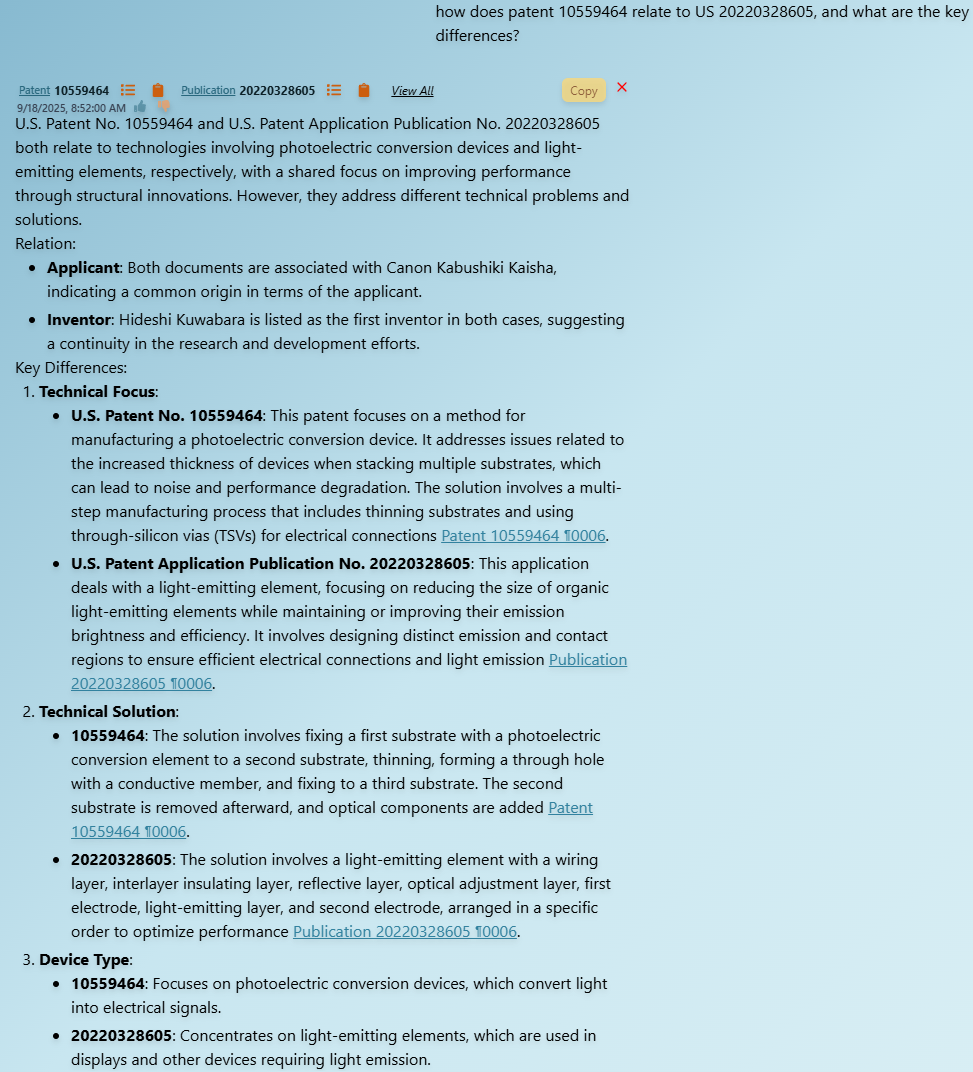
AI Chat Assistant
Intelligent AI-powered chat with multilingual support (70+ languages), document mentions, and context-aware analysis of patents and technical documents.
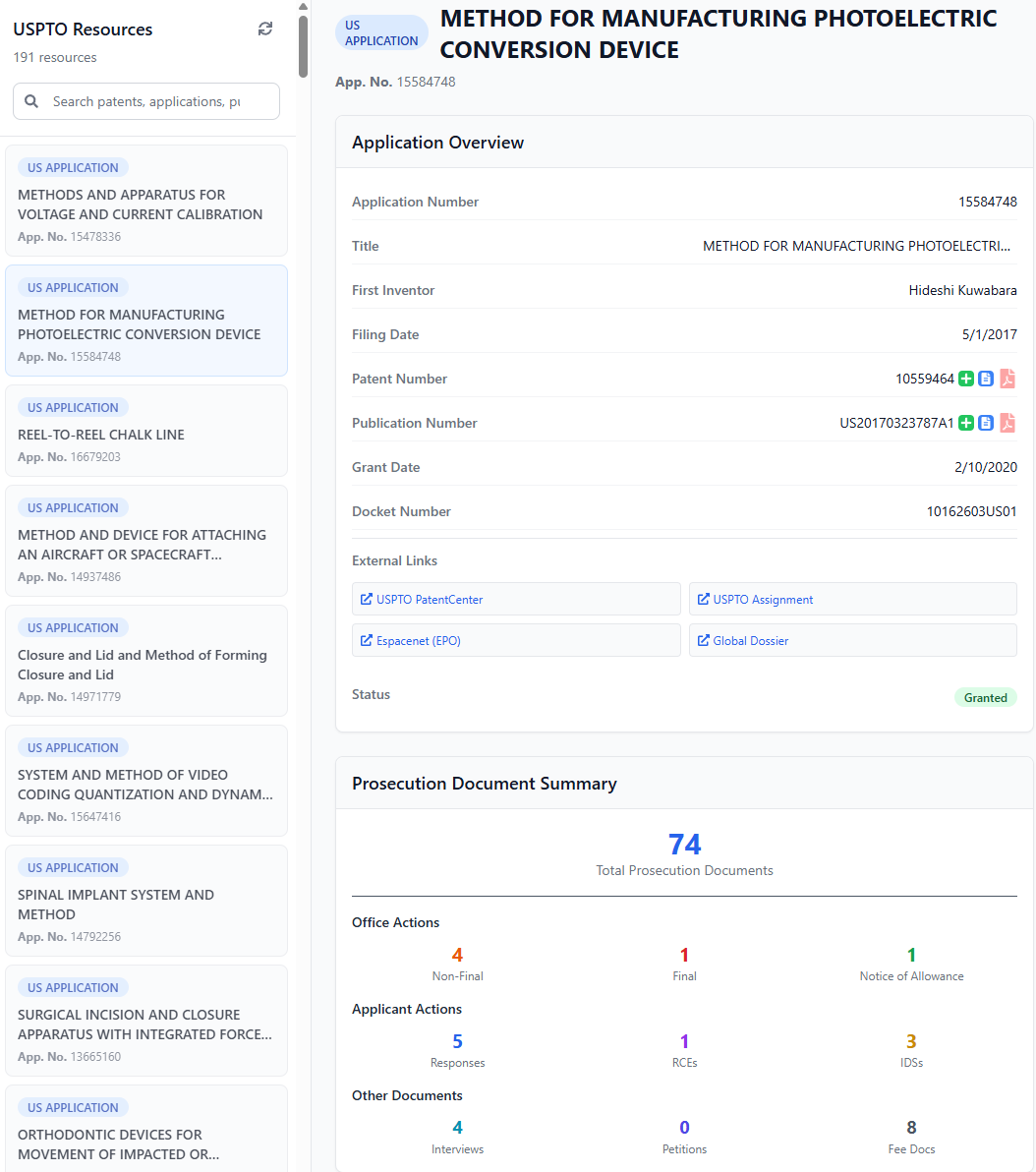
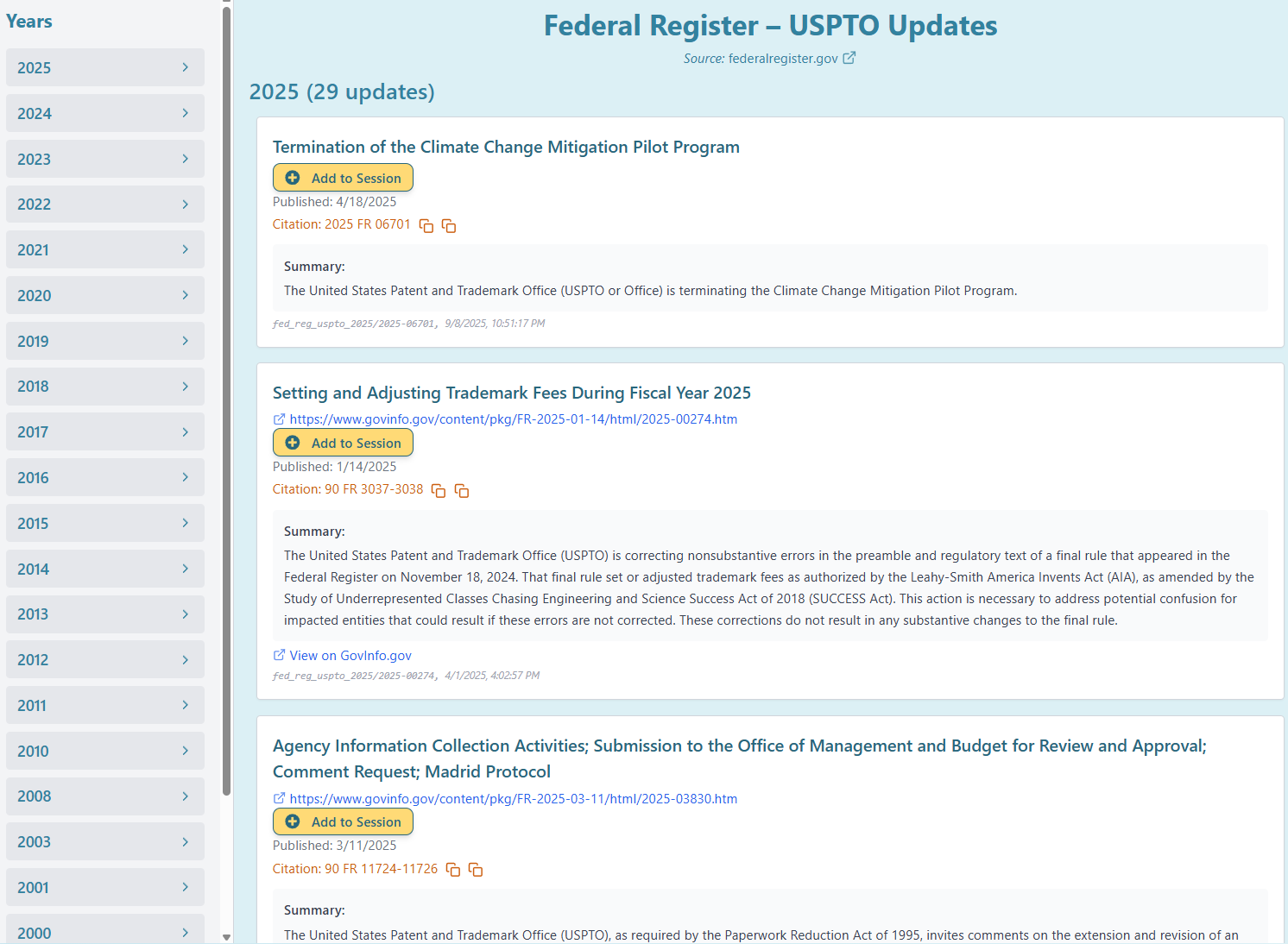
USPTO & EPO Integration
Direct access to USPTO and EPO application data with tracking capabilities, prosecution history documents, and export to Excel for portfolio management.
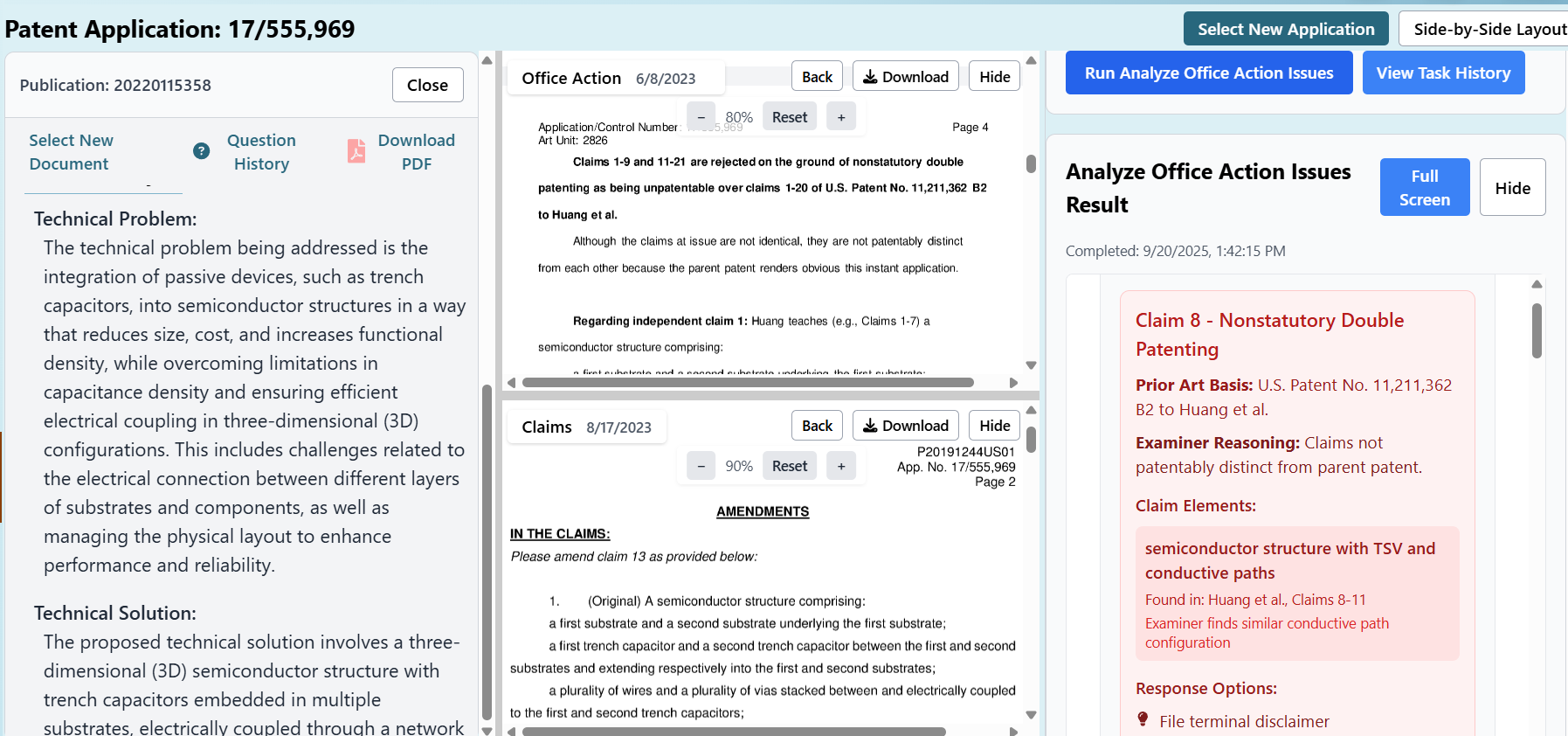
Office Action Analysis
Dedicated examination workspace with multi-document viewer for analyzing office actions alongside patent applications and prior art references.
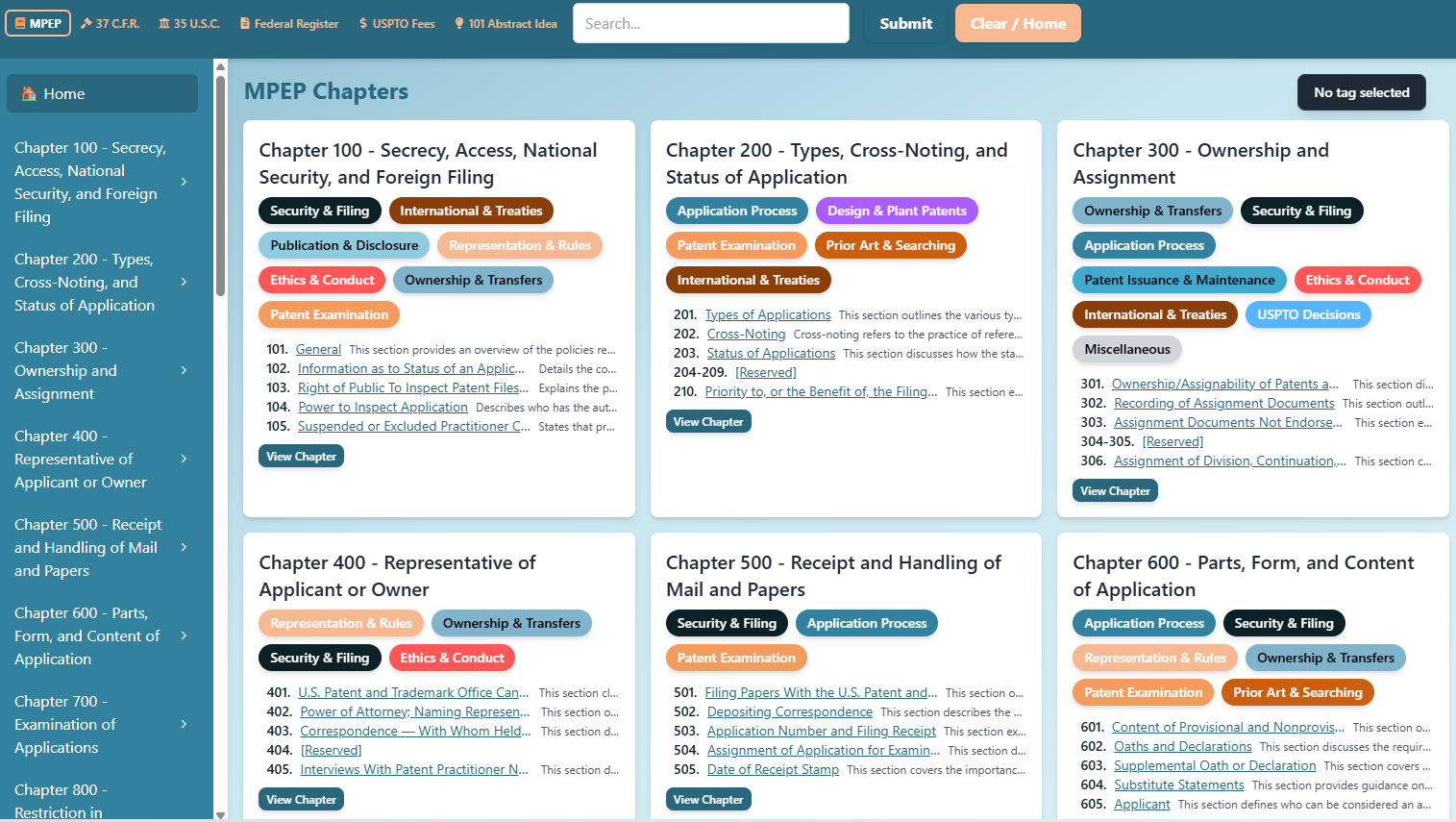
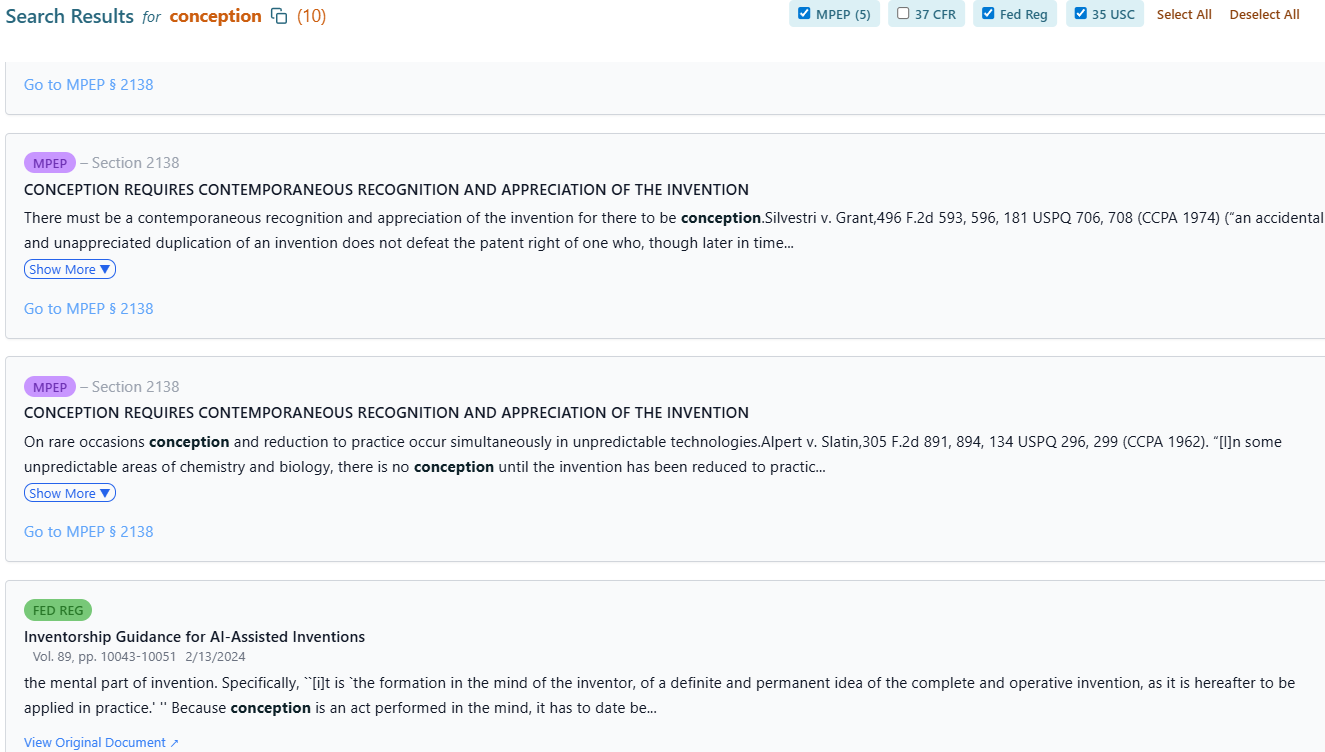
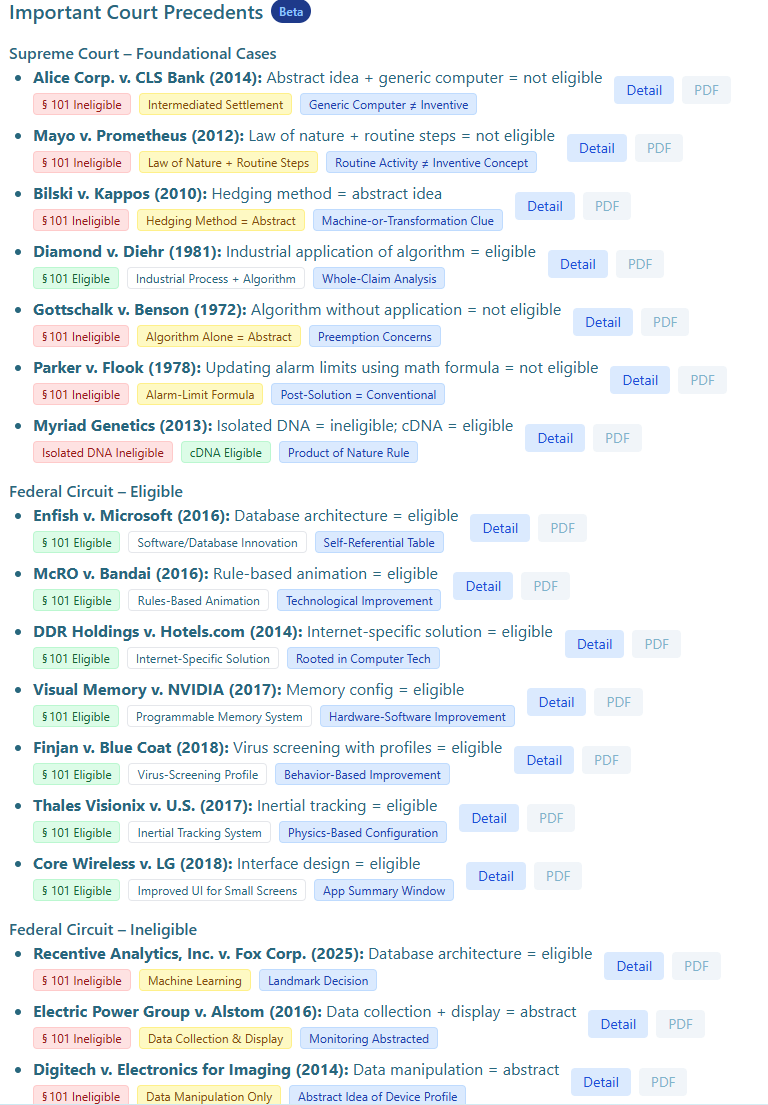
Legal Resources
Comprehensive access to MPEP, CFR, and USC with section navigation and full-text search capabilities for quick reference and research.
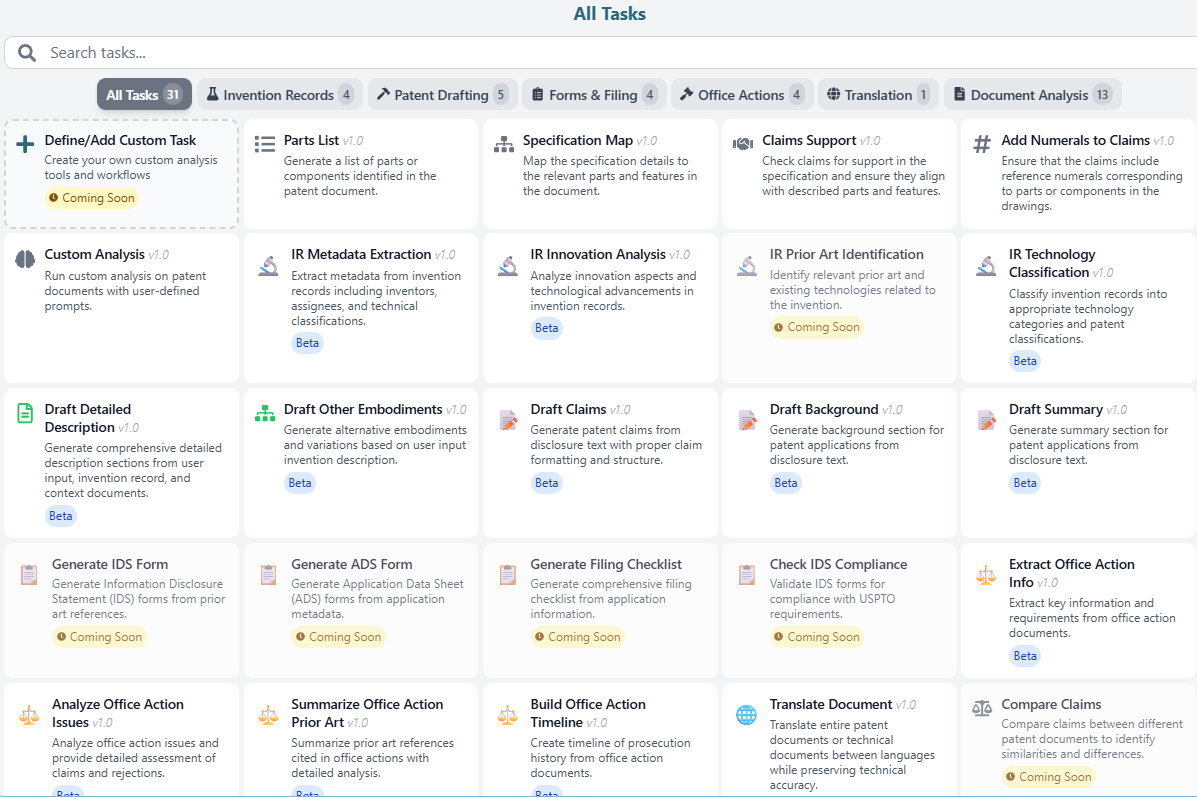
Automated Tasks
Extensive task suite including claim charts, antecedent basis checking, parts lists, specification mapping, translations, OCR, and drafting assistance.
Automatic Form Generation
Automated IDS population and form filling for RCEs, Terminal Disclaimers, Notices of Appeal, POA transmittals, and general transmittal forms.
Document Generation Tools
Automate your filing paperwork. Generate Office Action response shells, IDS forms, and pre-filled USPTO forms directly from your application data.
OA Response Shell
Generate a filled Office Action response document from your template. Automatically pre-populates application data, claim information, and rejection details so you can start drafting immediately.
- Template-based response generation
- Pre-filled claims & rejections
- Attach office actions & supporting docs
- Available on all plans
IDS Form Generator
Automatically generate USPTO-compliant Information Disclosure Statement forms. Enter patent numbers, and the system fetches all data, removes duplicates, and produces a ready-to-file PDF.
- Auto-fetches patent data from USPTO
- US, foreign, and NPL references
- Signature management & sorting options
- Searchable generation history
USPTO Forms Generator
Generate pre-filled USPTO forms from your application data. RCEs, Terminal Disclaimers, Notices of Appeal, POA transmittals, and more — populated and ready for filing.
- 6 form types (RCE, TD, NOA, etc.)
- Auto-filled from USPTO data
- Shared signature management
- Instant PDF download
Dedicated Workspaces for Every Stage
Beyond chat and tasks, Patent Loop includes three step-by-step tools: one for drafting a new application, one for answering an Office action, and one for understanding a technology and the prior art around it.
Drafting
Turn an invention disclosure into a complete patent application. Every step is reviewable and every change is reversible.
Explore Drafting → /actionOffice Action Response
Work from rejection to response: read the action, decide a strategy, amend, argue, and fill your firm's own template.
Explore Office Action → /fortechForTech Technology Insight
Build a corpus of documents in a technical field, map its problems and solutions, and run novelty and inventive-step assessments.
Explore ForTech →Patent Loop Drafting
Drafting turns an invention disclosure into a complete patent application, one confirmed step at a time. Each step builds on the ones you've accepted. You can go back to any step, and nothing the AI proposes is written until you accept it.
Eleven steps, disclosure to filing
- DisclosureAdd inventor notes, uploads, or patent numbers, each tagged as invention disclosure or background. Only disclosure material can support claim scope. Watch ▸
- ContributionsIdentify the one to four new concepts, each with its technical problem and effect, at a broad, intermediate, or specific breadth. Watch ▸
- BackgroundWritten only from the problems the contributions solve, without admitting what any reference teaches. Watch ▸
- ClaimsHave Drafting propose a claim set, or bring your own; pasted claims are kept exactly as written. Watch ▸
- FiguresPlan the figure set. A method claim gets a matching flowchart. Watch ▸
- OutlineOptional. An outline of the technology or of the specification, at a high level or in detail. Watch ▸
- ConfirmA checkpoint that checks the claims and figures agree before numbering begins. Watch ▸
- Detailed descriptionBuilt figure by figure: number the elements, introduce the figure, then discuss each element. Watch ▸
- Abstract & summaryDrafted after the description so both track the claims, with one aspect per independent claim. Watch ▸
- ReviewChecks antecedent basis, numeral consistency, §112(a) support, and possible means-plus-function language, plus a filing checklist. Watch ▸
- AssemblePuts together the complete application from your latest edits. Copy it or download it as Word. Watch ▸
Technology briefing
New to the field? Get a plain-language briefing drawn from the attached sources, with specialist terms explained. You can ask follow-up questions or download it as Word. It never goes into the application.
Stable reference numerals
Numerals run in even steps and continue across figures. Each numeral stays with its element for good. Rename an element once, and every paragraph and the parts list update.
Patent-style drawings
Draw any figure as a labelled line drawing. Label it with numerals only, with numerals and names, or leave it clean for a draftsperson. Earlier drawings are kept.
Your house style
The Examples library holds your saved paragraphs, custom paragraph types, and closing language. New paragraphs follow them, so every application reads like your firm's.
Chat that proposes, never overwrites
Ask about the draft and the answer cites the claim, figure, or paragraph it relies on. Ask for a change and you get proposals covering every affected passage. Review them as a diff, accept one or all, and undo any of them.
§112(a) support check
Each claim feature is matched to the passage that supports it, or flagged if nothing does. The result can be exported for your records.
Version history & sharing
A version is kept before every step that rewrites the draft, and you can save named versions yourself. Share with named colleagues for viewing or editing. There are no forwardable links, and access can be revoked.
Check an application
Upload an application drafted elsewhere and run the same review checks on it. You can also import an existing draft and continue from any step.
Choose your model
Draft with your choice of OpenAI or Anthropic models. Reference numerals and the parts list always use a fixed model, so switching models never renumbers a drawing.
Office Action Response
Office Action Response takes a US Office action from rejection to a response ready to file. Start with an application number. Patent Loop pulls the file wrapper from the USPTO and reads the action, the cited art, and the prosecution history. You decide how each rejection is answered, and it builds the paper in your firm's own template.
Seven steps, rejection to response
- Application & actionFetch the application and file wrapper, then choose the action being answered. For unpublished applications, upload the action and specification instead.
- RejectionsOne entry per rejection, not per claim, with the statute, the claims at issue, and the art relied on. For a §103 rejection, the examiner's stated motivation to combine is pulled out separately.
- ClaimsParses the claims of record, the ones pending now, without rewording them. You set each claim's status identifier.
- StrategyChoose how to answer each rejection: argue, amend, argue and amend, accept, or interview. Patent Loop recommends a strategy, and you make the call.
- AmendmentsPaste, upload, or edit the amended claims in place. Amendments are settled before any argument is written.
- RemarksFor each rejection, outline the argument first, approve the outline, then draft from it. The drafted remarks stay editable.
- ResponseAssembles the complete response: a full 37 CFR 1.121(c) claim listing, the remarks for each ground, and any allowable subject matter.
Cited art, actually read
Cited patents are retrieved so the analysis works from what each reference says at the cited passage, not the examiner's summary of it. If a reference can't be found, it's flagged with a way to upload it.
Non-patent literature, found
Journal articles and standards cited in the action are found in the application's own file wrapper, read with OCR, and matched to their citations. Ambiguous matches are flagged, never guessed.
Prosecution history, summarised
Each round of the file is read: what was rejected, over what art, what was argued back, and how the claims changed.
Your specification in the argument
The application's own specification is read so that §112 answers can cite support, claim terms are construed from your own words, and every amendment traces to a paragraph.
Outline before prose
Each argument starts as a short plan listing the points to make, what each rests on, and what the examiner is likely to say. Drafting starts only after you approve the plan.
Compliant claim listings
The listing is built in code, not by a model. Every claim appears once, in order, with its status identifier, and deletions and additions are marked.
Client communication
A reporting message tells the client the action has arrived. Once a plan is approved, a letter asks the client to agree to it before the argument is drafted. You write the letter's sections in your own register.
Your firm's templates
The template manager shows which of your response shells has a place for every ground the action raises. Approved remarks go into the template exactly as approved, never rewritten. Signature blocks are saved once.
Ask about the matter
Chat is available on every step and answers from everything the matter holds: the action, rejections, claims, cited art, specification, and file wrapper. It is read-only on purpose, so every change to the response is one you confirmed. An S-signature line is always left for the signer to insert personally, as 37 CFR 1.4(d)(2) requires.
ForTech Technology Insight
ForTech gives you insight into a technical field. Create a corpus, paste in a list of patent numbers, and ForTech reads every document. It extracts the problems, solutions, and features each one describes, with a verbatim quote behind every finding. You can then map the field, search it, and test an invention against it.
Every view of the corpus
- Technical mapShows how much of each technical facet the corpus covers. Facets where the field keeps raising problems but rarely solves them are flagged as open work.
- Problems & SolutionsLists each problem with everything offered against it. Problems nothing in the corpus solves are listed first.
- Feature mapA matrix of which documents discuss which features, grouped by facet. It shows where documents overlap and where one stands alone.
- GlossaryThe corpus vocabulary, with every alias the documents use. View it by hierarchy, by facet, or A–Z.
- CollectionsNamed subsets, built by hand or by an AI scan that proposes documents with evidence for you to accept. Narrow every view to one or more collections.
Findings you can check
Every extracted concept is shown beside the source sentence it came from. Concepts you add by hand are labelled as your own, not presented as extracted findings.
Editable facet taxonomy
Facets are derived automatically, and you can split, add, or rename them. A focus pass re-reads documents through a stated lens and only adds findings, so nothing is lost.
Three kinds of search
Search the corpus by word and wildcard, or semantically by idea. Search Google Patents for documents you haven't added yet, and pull the good ones into the corpus.
Composable search log
Every search is numbered, so later searches can combine earlier ones, as in #7 AND electrod*. Save a sequence of narrowing searches as one set, or build boolean queries over features.
Chat with the corpus
Ask questions of the documents, concepts, glossary, searches, and assessments without leaving the view you're reading.
Shared corpora
Share a whole corpus with colleagues, including its documents, glossary, searches, assessments, and chats. Only the owner can delete it or share it further.
Novelty & Inventive-Step Report
Describe an invention and pick the references: found automatically from the corpus, chosen by hand, entered as patent numbers, uploaded as documents, or pasted as text. ForTech breaks the invention into elements and charts every reference against them. It then reaches a conclusion under US obviousness, the EPO problem-solution approach, or both. Set a critical date, and later references are shown but not relied on. The finished report downloads as a Word document.
Element-by-element chart
For each reference, every element is marked disclosedpartial or absent, with the verbatim passages behind the call.
Novelty verdict
Whether any single reference anticipates the invention, the closest art, what distinguishes the invention from it, and which elements appear nowhere.
Combinations
For each pairing of a primary reference with secondary references: which elements it covers, which it meets only partly, and which are still missing.
US obviousness (§103)
A conclusion with a confidence level, the level of ordinary skill, rationales rated by strength with citations, and counterarguments.
EPO problem-solution
The closest prior art, distinguishing features, technical effect, and objective technical problem, and whether the skilled person would arrive at the invention.
Strengthening & caveats
Suggestions for strengthening the position, each noting whether your own material supports it. Also records where references teach away and the limits of the analysis.
Tutorial Videos
Narrated walkthroughs of each step, with captions and a searchable transcript.
/drafting). Walkthroughs for Office Action Response and ForTech are not available yet.
Tour of Patent Loop Drafting
A three-minute tour of the tools around the drafting steps: starting or importing an application, the Examples library, model choice, sharing, chat proposals you can review as a diff, and version history.
View all tutorialsComprehensive AI Task Suite
Powerful AI-driven tasks designed specifically for patent professionals. From document analysis to office action processing to automated IDS form generation, our platform handles every aspect of your patent workflow.
Extract Office Action Info
Extract key information and requirements from office action documents with detailed MPEP reference analysis.
Analyze Office Action Issues
Comprehensive analysis of office action issues with detailed assessment of claims and rejections.
Summarize Prior Art
Intelligent summarization of prior art references cited in office actions with detailed comparative analysis.
Build Prosecution Timeline
Create comprehensive timeline of prosecution history from office action documents and file wrapper.
Generate OA Report
Create professional email reports summarizing office action information for effective client communication.
OA Response Shell
Generate a filled Office Action response document from your template with pre-populated application data, claims, and rejection details.
Information Disclosure Statement (IDS)
Automatically generate USPTO-compliant IDS forms with patent data retrieval, signature management, and customizable reference sorting.
Draft Detailed Description
Generate comprehensive detailed description sections from invention records and technical documents.
Draft Claims
Generate patent claims from disclosure text with proper formatting and hierarchical claim structure.
Draft Background
Create background sections for patent applications from technical disclosure and prior art context.
Draft Summary
Generate clear and concise summary sections that capture the essence of the invention.
Draft Alternative Embodiments
Generate alternative embodiments and variations based on the core invention description.
IR Metadata Extraction
Extract structured metadata including inventors, assignees, and technical classifications from invention records.
IR Innovation Analysis
Analyze innovation aspects and technological advancements described in invention records.
IR Technology Classification
Classify inventions into appropriate technology categories and patent classifications (CPC/IPC).
IR Prior Art Identification
Identify relevant prior art and existing technologies related to the disclosed invention.
Document Translation
Translate entire patent documents between languages while preserving technical accuracy and legal terminology. Chat messages can be in nearly any language with 70+ language options available in chat settings.
LaTeX to Word Conversion
Convert LaTeX documents to Microsoft Word format while preserving equations, formatting, and structure.
PDF OCR
Extract text from scanned PDF documents with optical character recognition. Output as text, Word, or JSON.
Parts List Generation
Automatically generate comprehensive lists of parts and components identified in patent documents.
Specification Mapping
Map specification details to relevant parts, features, and drawing elements for improved clarity.
Claims Support Analysis
Verify claims have proper support in the specification with detailed element-by-element analysis.
Add Numerals to Claims
Enhance claims with reference numerals corresponding to parts in the drawings and specification.
Custom Analysis
Run custom AI analysis on patent documents with user-defined prompts and specific requirements.
Compare Claims
Compare claims between different patent documents to identify similarities, differences, and scope variations.
Check Antecedent Basis
Verify all claim elements have proper antecedent basis and clear referential relationships.
Claim Chart
Parse claims into phrases and identify supporting disclosure for each phrase in a three-column table format.
Assess Claim Definiteness
Evaluate claim language for definiteness issues and ambiguous terms under 35 U.S.C. § 112(b).
See Patent Loop in Action
Explore our comprehensive patent preparation and prosecution platform with real application screenshots
Transform Your Patent Practice
Patent Loop leverages cutting-edge AI technology to revolutionize patent preparation and prosecution. Our platform combines the power of ChatGPT with specialized patent expertise to deliver unprecedented efficiency and accuracy in patent preparation and analysis.
Whether you're preparing patent applications, conducting prior art searches, or managing patent portfolios, Patent Loop provides the intelligent tools you need to excel in today's competitive IP landscape.
Simple, Transparent Pricing
Choose the plan that fits your practice. Scale as you grow with flexible credits and no hidden fees.
Free
Pro
Contact us for a free trial
Premium
Contact us for a free trial
Flexible Pay-As-You-Go Credits
Need more power? Purchase credits for advanced AI tasks. Credits never expire.
Starting at $0.10/credit
Base rate for all AI-powered tasks
Volume Discounts
All credits are available immediately after purchase and never expire. Use them whenever you need to use AI-powered features.
Trust & Security
We are active patent attorneys in the US who use this for our practice, so confidentiality and security are our top priorities.
Patent Loop Interface
Secure Backend

By Professionals, For Professionals
Built by active patent practitioners who use these tools daily in Austin, Texas and Detroit, Michigan
Proprietary & Proficient
100% proprietary codebase written in-house using only native Python & JavaScript libraries with no third-party dependencies

Proven Excellence
Battle-tested by active patent attorneys and agents, refined through thousands of real patent workflows

Multi-Layer Security
Two-factor authentication (2FA), SSL/TLS browser security plus in-app secondary encryption layer. Enterprise-grade encryption with GDPR and CCPA compliance
Secure IP Protection
Your intellectual property data never leaves our secure systems. Built with zero-trust architecture and continuous security monitoring

Practitioner-Driven Development
Organic development driven by real-world patent work needs with continuous improvement based on practitioner feedback
Ready to Get in the Loop?
Experience the future of patent preparation and prosecution with Patent Loop's AI-powered platform.
Launch Patent Loop